
Faster email replies and Your team in control
Your reservations team answers the same guest emails every day. Email Copilot drafts each reply for them, built from your own Knowledge Base and Answer Templates, ready to review, edit, and send. Nothing goes out without a human check.
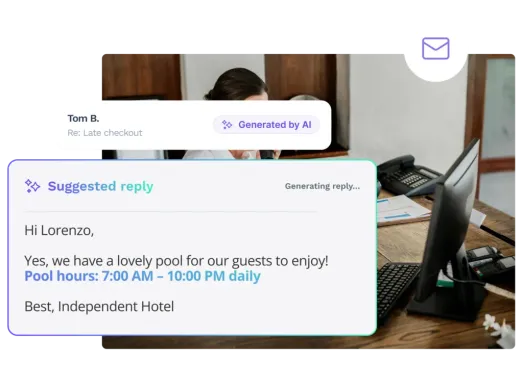
Email Copilot for Hotels
Never start from a blank page
When an eligible email arrives, Email Copilot starts drafting straight away, so a suggested reply is often waiting the moment your team opens the thread. Built from your Answer Templates and Knowledge Base, it gives your team a written reply to review and send, not an empty box to fill.
Answers drawn from your sources, not invented
Email Copilot writes from your Knowledge Base, and shows you the exact documents behind every reply. When the information isn’t there, it flags the gap with a visible tag rather than guessing, and keeps Send switched off until a person fills it in. Your team can trust what goes out, because they can see where it came from.
Answer every question in one reply
Guests rarely ask just one thing. When an email contains several questions, Email Copilot spots each one and pulls the relevant facts from your Knowledge Base into a single, well-structured reply, so nothing gets missed and your team doesn’t answer the same email twice.
Reply in the guest's language
Draft in your team’s Console language, then translate into any language the Console supports. The original and translation sit side by side, so your team can check the wording before sending, and reply confidently even in languages they don’t speak.
Email Copilot Features
AI-drafted replies
Email Copilot suggests a reply for each incoming guest email, drawn from your Answer Templates and Knowledge Base, so your team edits and sends instead of writing from scratch.
Replies to several questions at once
When a guest asks about more than one thing in a single email, Email Copilot combines the relevant templates and information into one coherent draft.
Human tags for missing information
Where a reply needs staff judgement or information that isn’t in the Knowledge Base, Email Copilot inserts a visible tag showing exactly what to add.
Send stays disabled until it's ready
For replies that still need input, the Send button stays switched off until every tag is resolved, so an incomplete reply can’t go out by accident.
Source Insights
See the templates, Knowledge Base documents, and page URLs behind every suggestion, plus the property and chatbot context.
Thread summaries
Summarise long or complex email threads on demand, so your team can catch up quickly during handovers or ongoing conversations.
Translation with side-by-side review
Tone adjustment
Adjust the tone of a reply with Power Tools before it goes out, so the wording fits your property.
Automatic personalisation
Email Copilot addresses the guest by name and applies the correct signature automatically.
AI transparency labels
Sent replies are labelled to show whether a suggestion was sent as-is or edited first, so managers have a clear view of how AI is being used.
Reporting
A dedicated report tracks usage, speed, adoption, template performance, Knowledge Base gaps, and time saved on drafting.
Always a human in the loop
Nothing is sent automatically. Your team reviews and sends every reply.
Email Copilot: FAQs
What is Email Copilot?
Email Copilot is an AI assistant inside the HiJiffy console that drafts email replies for hotel reservation and front desk teams. It suggests a reply for each incoming guest email, and your team reviews, edits, and sends it.
Does Email Copilot send emails on its own?
No. Nothing is sent automatically. Your team always reviews and sends the final reply. If a draft still needs human input, Send stays disabled until it’s complete.
What does Email Copilot use to write replies?
It uses your Knowledge Base and Answer Templates together. The Knowledge Base provides the facts, such as policies, amenities, and check-in details. Answer Templates set how those facts are structured into a reply and where a person needs to step in.
What happens if the answer isn't in the Knowledge Base?
Email Copilot still produces a structured draft, but inserts a visible tag showing exactly what the team member needs to add, rather than filling the gap itself.
Can one reply cover several guest questions?
Yes. When an email contains more than one request, Email Copilot blends the relevant templates and information into a single coherent draft.
What languages does Email Copilot support?
Replies are drafted in your team’s console language, and can be translated into any language the console supports. Your team can compare the original and the translation side by side before sending.
Can we see whether a reply used AI?
Yes. Sent emails are labelled to show whether the AI suggestion was sent as-is or edited first. If a suggestion is ignored, no label is applied. A dedicated report also tracks adoption and performance over time.
What does a hotel need before using Email Copilot?
An Aplysia 3 chatbot, an email account connected in the console, a configured Knowledge Base, at least one active Answer Template, and a defined console language. HiJiffy enables the add-on, then it’s switched on for each email channel you choose.
Is Email Copilot included in the plan?
Email Copilot is a paid add-on. It works on the email channel only, and can be switched on or off per channel at any time.